How to Maximize PTO on a Four-Day Workweek
Plan PTO for a four-day workweek without wasting leave on your regular day off. Includes setup instructions and the highest-value holiday patterns.

A four-day workweek changes the PTO math. If Friday is already free, a Monday holiday creates a four-day break with no PTO. Taking one working day beside that block can produce five consecutive days off for the cost of one.
The essential setup step is to tell Holiday Optimizer which weekdays you normally do not work. Otherwise it will assume a standard Saturday–Sunday weekend and may recommend PTO on a day you already have off.
For comparison, the U.S. Office of Personnel Management's compressed-schedule model describes a four-day week as four 10-hour days totaling 40 hours. Your arrangement might instead be a reduced-hours schedule, so confirm whether a “PTO day” costs 8 hours, 10 hours, or another amount before copying a whole-day result.
Configure your weekly days off
For a Monday-to-Thursday schedule:
- Open Customize Weekends.
- Select Friday, Saturday, and Sunday as your regular days off.
- Leave Monday through Thursday as working days.
- Review the detected public holidays against your employer's calendar.
- Enter your PTO allowance and preferred break style.
If your schedule is Tuesday-to-Friday, select Saturday, Sunday, and Monday instead. The label “weekend” in the tool means your recurring non-working weekdays; it does not have to mean Saturday and Sunday.
The best four-day-week patterns
Monday holiday on a Monday-to-Thursday schedule
Friday through Monday is already a four-day break. Taking Tuesday adds one day but may not be the best marginal use of PTO. Taking Tuesday through Thursday costs three PTO days and creates seven consecutive days off from the prior Friday through Thursday.
Thursday holiday with Friday already off
Thursday through Sunday becomes a free four-day break. Taking Wednesday creates five days for one PTO day. This is one of the clearest high-return opportunities on this schedule.
A full calendar week
A Monday-to-Thursday worker normally needs four PTO days to take Monday through Sunday off. If a public holiday lands on one of those working days, the cost drops to three. That is a seven-day trip for three PTO days.
| Goal | Typical PTO cost on Mon–Thu schedule |
|---|---|
| Regular Fri–Sun reset | 0 |
| Four days with a Monday or Thursday holiday | 0 |
| Five days around a holiday edge | 1 |
| Full Monday–Sunday week with one weekday holiday | 3 |
2027 Mon–Thu PTO Opportunity Engine: Compare 10, 15, and 20 Days
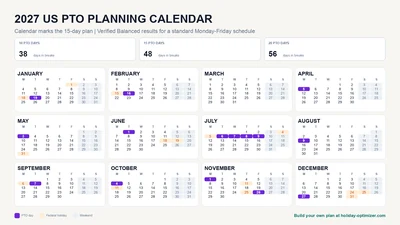
Using Holiday Optimizer's Balanced strategy against the real 2027 US federal holiday calendar with weekends set to Friday, Saturday, and Sunday, 10 PTO days produce 47 calendar days inside 10 selected breaks, 15 produce 62 days inside 13 breaks, and 20 produce 74 days inside 12 breaks. That is consistently more total time off than the same allowance on a standard Monday-to-Friday schedule, because every Friday is already free — PTO only has to bridge the remaining working days. The table below shows the exact gap against the standard Monday–Friday 2027 dataset at the same allowance.
| PTO allowance | Days in breaks | Breaks | Longest | Days per PTO | vs Mon–Fri |
|---|---|---|---|---|---|
| 10 days | 47 | 10 | 5 days | 4.7× | +9 days |
| 15 days | 62 | 13 | 10 days | 4.1× | +14 days |
| 20 days | 74 | 12 | 10 days | 3.7× | +18 days |
“Days in breaks” counts only the calendar days inside the optimizer's selected vacation windows—not every ordinary Friday–Sunday weekend in the year. “vs Mon–Fri” compares against the standard Monday–Friday, Saturday–Sunday-weekend dataset already published for the 2027 US guide, at the same PTO allowance.
Exact 10-day PTO plan (Mon–Thu schedule)47 days inside 10 recommended breaks
PTO dates to request
- Jan 19
- Feb 16
- May 3
- Jun 1
- Jul 6
- Aug 9
- Sep 7
- Oct 12
- Nov 29
- Dec 27
Strongest opportunities
Jan 15–19
5 days off using 1 PTO
Feb 12–16
5 days off using 1 PTO
May 28–Jun 1
5 days off using 1 PTO
Exact 15-day PTO plan (Mon–Thu schedule)62 days inside 13 recommended breaks
PTO dates to request
- Jan 19
- Feb 16
- Mar 15
- Apr 12
- May 10
- Jun 7
- Jul 6–8
- Aug 9
- Sep 7
- Oct 4
- Nov 1
- Nov 29
- Dec 27
Strongest opportunities
Jul 2–11
10 days off using 3 PTO
Jan 15–19
5 days off using 1 PTO
Feb 12–16
5 days off using 1 PTO
Exact 20-day PTO plan (Mon–Thu schedule)74 days inside 12 recommended breaks
PTO dates to request
- Jan 19
- Feb 16
- Mar 15
- Apr 12
- May 10
- Jun 7
- Jul 6–8
- Aug 9
- Sep 7–9
- Oct 12–14
- Nov 22–24
- Dec 27
Strongest opportunities
Jul 2–11
10 days off using 3 PTO
Sep 3–12
10 days off using 3 PTO
Oct 8–17
10 days off using 3 PTO
Last verified . Baseline: US federal holidays, a Monday–Thursday workweek with Friday–Saturday–Sunday as the recurring weekend, and no pre-booked or company-specific days. To reproduce these exact numbers, select Friday, Saturday, and Sunday under Customize Weekends before reviewing your plan — the buttons below open the optimizer with its default Saturday–Sunday weekend. Confirm your own compressed-schedule and holiday-observance rules with your employer.
Download the data (CSV)Holiday calendar reference: U.S. Office of Personnel Management (federal holidays). Compressed-workweek reference: U.S. Office of Personnel Management (compressed work schedules). Holiday data is derived from date-holidays under CC BY-SA 3.0. See the calculation methodology.
Do not count every calendar day as an improvement
A four-day worker begins with more three-day breaks than a standard worker. An optimizer could inflate its score by listing those ordinary weekends repeatedly, even though no PTO decision created them. Holiday Optimizer focuses its output on breaks shaped by PTO, holidays, or company days rather than treating every routine weekend as a special win.
That distinction matters. The useful question is not “how many non-working days exist?” It is “where does one PTO day connect the most naturally free time?”
Choose a strategy that matches your goal
- Pick Long Weekends if you want frequent four- and five-day breaks.
- Pick Week-Long for fewer, travel-sized blocks.
- Pick Balanced when you want both and do not want the result dominated by one break shape.
You can also add shutdowns and recurring company-wide closures under Company Days Off. If a closure happens every Friday, it belongs in Customize Weekends; if it occurs on specific dates, add those dates individually.
Ready to maximize your time off?
Plan PTO for my four-day workweek
Sources and scope
- U.S. Office of Personnel Management: Alternative Work Schedules — provides an official four-day, 10-hour compressed-workweek model.
- U.S. Office of Personnel Management: Compressed Work Schedules — explains fixed compressed schedules and holiday pay for covered federal employees.
- U.S. Department of Labor: Leave Benefits — explains that many U.S. vacation and holiday benefits depend on the employer or employee agreement.
These sources define common U.S. schedule and leave concepts. A four-day week can be compressed, reduced-hours, contractual, or collectively bargained; the optimizer models whole working and non-working dates, not payroll-hour rules.
Frequently Asked Questions
Does Holiday Optimizer support a four-day workweek?
Yes. Customize Weekends lets you select the weekdays you regularly have off, including three-day weekly breaks.
Should I add my regular Friday off as a company day?
No. If every Friday is free, select Friday as a recurring weekend day. Use Company Days Off for date-specific closures or alternating days.
Is a Monday holiday still useful if I already have Friday off?
Yes. It creates a free four-day break from Friday through Monday. Adding Tuesday can extend it to five days for one PTO day.
What if my four-day schedule changes each week?
Use the recurring-day setting only for stable patterns. Add irregular non-working dates as Company Days Off so the calendar reflects the actual schedule.