PTO Expiring at Year-End: How to Use It Before You Lose It in 2026
A practical plan for spending unused PTO before it expires December 31 — how much you can still fit depends on how many days you have left and how late in the year it already is.

If your PTO resets every January 1 and some of it expires unused, the question that matters isn't "how do I maximize the whole year" — it's "what can I still fit before December 31, starting from today?" That answer depends entirely on how many days you have left and how much of the year remains.
This guide is for a standard calendar-year PTO reset. If your allowance resets on a different date — your work anniversary, a fiscal year, a mid-year cliff — use the fiscal-year PTO planning guide instead, since the math and deadlines are different.
Ready to maximize your time off?
See what my remaining PTO can still cover this year
The three verified windows left in the year
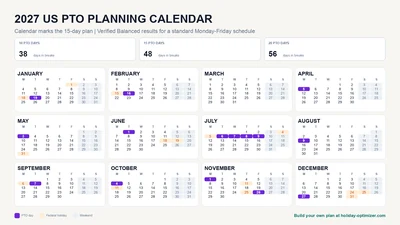
For a standard US calendar and a Monday-to-Friday schedule, three dated windows carry almost all of the remaining leverage between now and December 31:
| Window | Holiday anchor | PTO to request | Result |
|---|---|---|---|
| Veterans Day | Wednesday, November 11 | Nov 12–13 | 5 days off, Nov 11–15 |
| Thanksgiving | Thursday, November 26 | Nov 23–25, Nov 27 | 9 days off, Nov 21–29 |
| Christmas–New Year's | Fri Dec 25 + Fri Jan 1 | Dec 24, Dec 28–31 | 11 days off, Dec 24–Jan 3 |
These figures come directly from the full 2026 US PTO guide — not re-derived here, so they stay consistent with the rest of the site. Using all three windows costs 11 PTO days in total (2 + 4 + 5).
Not every employer observes Veterans Day as a paid holiday, and some already close between Christmas and New Year's. Confirm your own company calendar before counting on any of these three windows.
What to do depends on how many days are left
If you have 3 days or fewer left: The Veterans Day bridge fits inside a small balance — 2 PTO days for a 5-day break. If Veterans Day has already passed or your employer doesn't observe it, save the days for a 1-2 PTO day bridge into the Christmas–New Year's stretch instead of spreading them across unrelated Fridays.
If you have 4 to 10 days left: You can cover the Thanksgiving window in full (4 days), or the Veterans Day bridge plus a partial Christmas bridge. Check whether your company already closes for part of the year-end stretch; if it does, you may need fewer days than the table shows.
If you have 11 or more days left: You can cover all three windows above in full. With more than 11, add a genuine second trip earlier in the year rather than padding the same three windows further — run the actual optimizer with your real balance and end date for the exact combination.
Don't forget what your company already gives you for free
Before spending PTO on any of these windows, check for:
- Company shutdown days. Many employers close entirely between Christmas and New Year's. If yours does, those days are free — don't spend PTO on them. Add them as Company Days Off in the optimizer so it treats them as already-covered, not as part of your balance.
- Black Friday. If your company already gives it as a holiday, the Thanksgiving window above drops from 4 PTO days to 3.
- Floating holidays. Some employers issue floating or personal days separately from PTO, with their own expiration rules. Check whether they expire on the same date as your PTO balance — they often don't.
Confirm the deadline itself
"Year-end PTO" assumes a December 31 expiration, but the actual rule is set by your employer's policy and, in the US, can be shaped by state law. Some states restrict "use it or lose it" policies and require unused PTO to be paid out or carried over instead of forfeited. Confirm your own deadline, carryover cap, and payout policy with HR before treating December 31 as a hard cutoff — the date in your handbook is the one that matters, not the date in this guide.
How to build the plan in Holiday Optimizer
- Enter your actual remaining PTO balance, not your original annual allowance.
- Set the timeframe to end December 31 of the current year.
- Add any company shutdown days or floating holidays as Company Days Off so they don't compete with your real balance.
- Choose Balanced to spread the remaining days across the strongest windows, or a specific strategy if you already know how you want to use them.
- Run the optimizer and compare the result against your approval deadlines — the best windows above are also the most requested, so submit early.
Sources and scope
- U.S. Department of Labor: Vacation leave — explains that federal law generally leaves vacation and PTO policy, including forfeiture, to the employer agreement.
- U.S. Office of Personnel Management: Federal holidays — official federal holiday dates and observed-date rules used throughout this guide.
This guide is planning information, not legal or HR advice. "Use it or lose it" rules vary by state and by employer; confirm your own deadline and carryover policy before relying on any date here.
Frequently Asked Questions
What if my PTO doesn't reset on January 1?
This guide assumes a standard calendar-year reset. If your allowance resets on your work anniversary, a fiscal year, or another date, use the fiscal-year PTO planning guide instead — the deadline and the math both change.
Can I really turn 3 PTO days into 9 days off this late in the year?
Yes, if the day count and the calendar line up — the Thanksgiving and Christmas–New Year's windows above are both real, dated examples from the current year's federal holiday calendar. The exact PTO cost depends on which days your employer already gives you for free, like Black Friday or a holiday shutdown.
Does my company have to let me carry PTO into next year instead of losing it?
It depends on your employer's policy and, in the US, your state. Some states limit or prohibit "use it or lose it" forfeiture and require payout or carryover instead. This guide doesn't cover employment law — check your handbook or ask HR.
Should I request all my remaining days at once?
Not necessarily. Submitting a small number of highly efficient requests (built around the windows above) is usually easier to get approved than one long block during the year's busiest stretch. Spread requests across the remaining weeks where possible, and submit early since year-end windows are the most contested time of year.